AprilTag Pose
The SDK can evaluate a flat AprilTag (not curved) to estimate pose, the combination of:
relative position from the camera lens center to the AprilTag center, and
orientation of the AprilTag in the camera’s reference frame
As described at the previous page FTC Reference Frame, position is expressed as (X, Y, Z). Orientation is expressed as rotation about (X, Y, Z), called Pitch, Roll and Yaw respectively.
The tag must be in the Library, which ensures that tag size (with units) is defined. Estimating pose requires knowing the tag size.
As demonstrated in the Sample OpModes, here are ways to retrieve the estimated pose values.
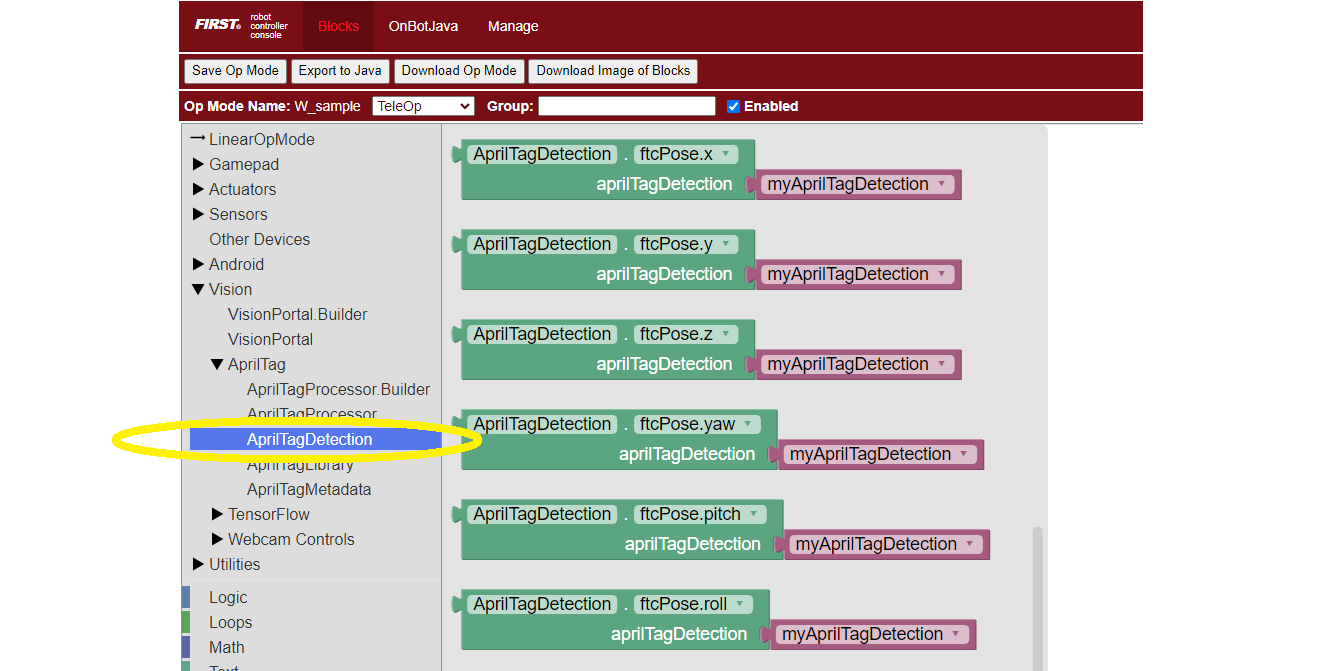
AprilTag Pose Blocks
Use each of these green Blocks to pass a Pose value to a Telemetry Block, or to a Variable:
Use these ftcPose fields for Telemetry, or assign to a Variable:
AprilTagDetection myAprilTagDetection;
double myTagPoseX = myAprilTagDetection.ftcPose.x;
double myTagPoseY = myAprilTagDetection.ftcPose.y;
double myTagPoseZ = myAprilTagDetection.ftcPose.z;
double myTagPosePitch = myAprilTagDetection.ftcPose.pitch;
double myTagPoseRoll = myAprilTagDetection.ftcPose.roll;
double myTagPoseYaw = myAprilTagDetection.ftcPose.yaw;
The SDK terms for Pitch, Roll and Yaw are not the same as the native AprilTag terms, due to the FTC reference frame.
Teams may find it helpful to use a calculated extension of the basic pose, with these terms:
Range, direct (point-to-point) distance to the tag center
Bearing, the angle the camera must turn (left/right) to point directly at the tag center
Elevation, the angle the camera must tilt (up/down) to point directly at the tag center
Here each green Block assigns its value to a Variable:
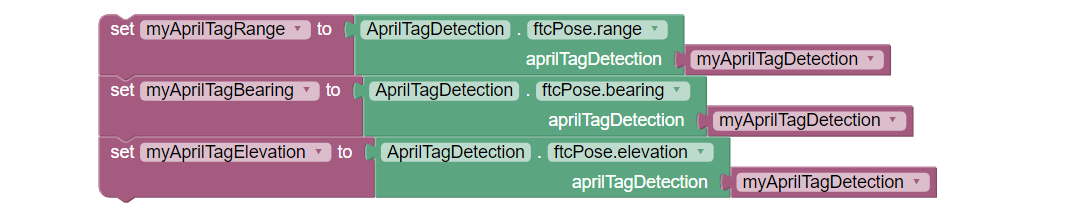
AprilTag Range, Bearing, Elevation Blocks
Use these ftcPose fields for Telemetry, or assign to a Variable:
AprilTagDetection myAprilTagDetection;
double myTagPoseRange = myAprilTagDetection.ftcPose.range;
double myTagPoseBearing = myAprilTagDetection.ftcPose.bearing;
double myTagPoseElevation = myAprilTagDetection.ftcPose.elevation;
Here, the terms do agree with the SDK method names, because they are calculated within the SDK from the native AprilTag pose values shown above (XYZ distances and PRY rotations).
Note
ftcPose, rawPose and robotPose are declared on
AprilTagDetection itself, so they are available on single-tag and
Cluster detections alike, with no cast. .id and .metadata are not.
The snippets on this page work unchanged for either detection type.
Pose of a Cluster
For an AprilTag Cluster, the reported pose is not the center of any one tag. A Cluster reports a location defined relative to the cluster, and that location can be a point off the cluster entirely. This lets a Cluster point at a nearby target, such as the center of a goal opening.
Check two Cluster-specific values before acting on a Cluster’s pose:
ftcPose.rolltells you whether the Cluster is right-side up from the camera’s point of view. An absolute value less than 90 means right-side up. Where a game mounts Clusters on movable elements, this separates a target that is oriented for scoring from one that is not.percentClusterFound, anintonAprilTagClusterDetection, reports what percentage of the Cluster’s member tags are visible. A low value can mean the Cluster is partly occluded. Do not reject a target on this value alone. Read it together with the roll.
For worked examples of both checks, see AprilTag Clusters.
As with tag ID code, pose data is usually retrieved inside a for() loop,
for immediate processing or stored for later use. See the Initialization
page for sample for() loop code.
Unlike tag ID code, a detected single AprilTag might provide no pose data – if it was not placed into the Library by default or with the custom Builder pattern. Namely, the tag might lack Metadata including tag size, required for pose estimation.
To avoid logic errors, an OpMode can cast the detection to
AprilTagSingleDetection and check its Metadata for a null condition
before processing pose data. A Cluster detection needs no such check. Its
Metadata is always present. This is illustrated in these Sample OpModes:
Blocks: ConceptAprilTag
Java: ConceptAprilTag.java
More discussion of AprilTag pose data is available here:
Understanding AprilTag Detection Values
Questions, comments and corrections to westsiderobotics@verizon.net